
The Unexpected Communications Snag

Quakes disrupt Asia communications

SINGAPORE (Reuters) — Telecommunications around Asia were severely disrupted on Wednesday after earthquakes off Taiwan damaged undersea cables, slowing Internet services and hindering financial transactions, particularly in the currency market.

I am always hearing of different failures in communication networks. Whether it be a telephone-pole-knocking-down car accident or a ruin-all-your-outlets flood, damage occurs a lot and typically is pretty centralized. I was shocked when I learned about the massive snag in communications across Asia in 2006. In December, these communications were suddenly sluggish and some stopped completely. Businesses were halted. This barrier was caused by an earthquake that occurred near Taiwan. Undersea cables nearby were damaged. Below is a CNN news article that highlighted this issue.

Banks and businesses across the region reported problems with communications, with some telephone lines cut and Internet access slowing to a crawl.

South Korea’s top fixed-line and broadband service provider, KT Corp, said in a statement that six submarine cables were knocked out by Tuesday night’s earthquakes.

“Twenty-seven of our customers were hit, including banks and churches,” a KT spokesman said. “It is not known yet when we can fully restore the services.”

Banks in Seoul said foreign exchange trading had been affected.

“Trading of the Korean won has mostly halted due to the communication problem,” said a dealer at one domestic bank.

Some disruption was also reported in the important Tokyo currency market but the EBS system that handles much dollar/yen trading appeared to be working.

Global information company Reuters Group Plc said all users of its services in Japan and South Korea had been affected.

One Tokyo foreign exchange trader said: “There are many currencies in which market-making is being conducted via Reuters and such currencies such as the Australian dollar and the British pound are in a very tenuous situation now.”

State secret

In China, trading in currencies and copper appeared to be normal and both the Shanghai stock market and money market were working.

But China Telecommunications Group, the country’s biggest fixed-line telephone operator and parent of China Telecom Corp., said the earthquakes had affected lines “from the Chinese mainland to places including the Taiwan area, the United States and Europe, and many have been cut”.

“Internet connections have been seriously affected, and phone links and dedicated business lines have also been affected to some degree,” it said.

Officials declined to give further details. “Undersea communications cables fall in the area of state secrets,” said a ministry of communications official in Beijing.

The main quake, measured by Taiwan’s Central Weather Bureau at magnitude 6.7 and at magnitude 7.1 by the U.S. Geological Survey, struck off Taiwan’s southern coast at 1226 GMT on Tuesday. Two people were killed.

Taiwan’s Chunghwa Telecom said two of four major undersea cables out of Taiwan had been affected. Voice circuits had been reduced to 40 per cent of capacity to the United States and just 2 per cent to most parts of Southeast Asia.

KDDI Corp., Japan’s second-largest telecoms company, said communications along submarine cables out of Japan went through Taiwan before reaching Southeast Asian countries, which was leading to disruption.

But it said communications were unlikely to break down completely since there were alternative lines.

PCCW, Hong Kong’s main fixed-line telecoms provider, said several undersea cables it part-owned had been damaged. “Data transfer is down by half,” a spokeswoman said.

Both Singapore Telecommunications (SingTel), Southeast Asia’s top phone company, and local rival StarHub Ltd., said customers were suffering slow access to Internet pages.

But SingTel said traffic was being diverted and repair work was in progress, adding: “Our submarine cables linking to Europe and the U.S. are not affected.”
How to Prepare Your Office for a T1 Installations

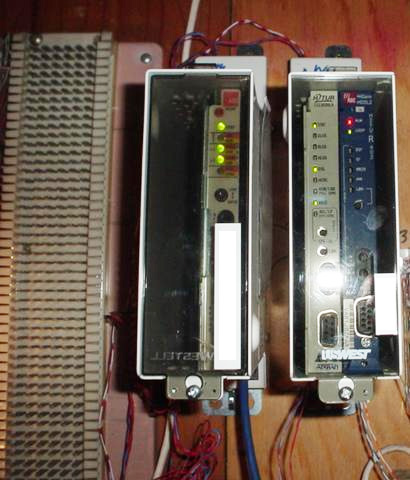
smart jackIf you order T1 services for your new office, here is a list of things you need to do to prepare the site. If the site is not properly setup, you will be bumped to the end of the installation queue. That is why it is very important to make sure you have everything ready to go. After the T1 has been installed by the service provider, you will need to hire a separate technician to connect your network to the T1. This service is known as a demarc extension.
Installation Coordinator

The first thing you need is a chose representative from your company to be the point of contact to coordinate the install. When you order your service they will ask you for his or her name and phone number. That person has to have the proper knowledge and authority of the building and the services that are being installed. This includes access to the building and where & when the circuit is to be installed. This chosen person is usually the building manager or owner.

Physical Preparation for the T1 Circuit

The building must be prepared for the T1 installation to be completed in a timely manner. You will need the following materials:

  • 4’x8′ sheet of flame retardant plywood
  • #6 AWG grounding wire
  • Conduit
  • Pull string

First, install the plywood near the point of service. This will act as a backboard where the service provider will install their hardware and equipment. Make sure that you install this in near proximity to the point where the cables enter the building. Your service provider will not extend the cabling to a remote part of the building.

Second, connect a #6 AWG grounding wire from the backerboard to the main power circuit. This will act like a ground so the service provider can ground their equipment.

Third, install external and internal conduit pathways for the routing of the new cables. Conduit keeps a clear pathway for the installers.

Lastly, install a pull string through the conduit, so the service provider can pull their cables to the installation spot.

Installation Day

If you have followed the above steps, installation day should be very easy and be performed quickly. The service provider will contact you and let you know when they will be onsite. When they get onsite, you will need to show them where their services are to be performed. Make sure you have any keys or permissions to access different areas of the building.

Post Installation

After the T1 has been installed, you will need to hire a private company to run another cable from the T1 to your equipment closet. This process is called a demarc extension. This video covers the basics of a demarc extension. You can also find out more about our demarc extension services here.

Structured Cabling Standards

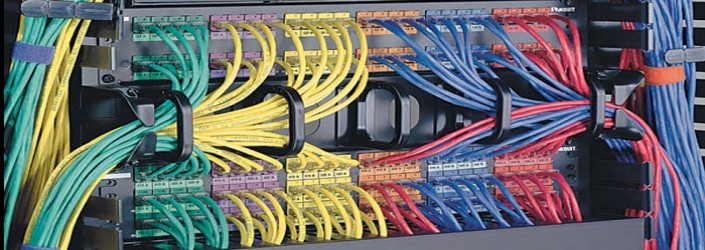
Network cabling infrastructure for telecommunications is a broad category that encompasses many aspects of installing cable in commercial or residential buildings. The governing board, TIA Engineering Committee TR-42, has sub-divided network cabling into a number of different categories of cable and establishing standards for each subsystem. These standards apply to cabling infrastructure in residential living spaces, data centers, commercial buildings, industrial facilities, and more. The scope of the standards include layout, distance specifications, and outlet configuration. They cover copper (such as Cat5e, Cat6) and fiber optic cabling and components, installation, field testing, administration, pathways, spaces, and proper support of the cabling.

With the ratification of the TIA 568-C.0 and TIA 568-C.1 standard, TIA defines six subsystems of structured cabling system. They are as follows:

  • Entrance Facilities (EF)
  • Equipment Room (ER)
  • Backbone Cabling
  • Telecommunications Room and Telecommunications Enclosure
  • Horizontal Cabling
  • Work Area

Entrance Facilities (EF)

Entrance facilities house the cables that connect with the external systems. This includes the demarcation point, hardware used to connect, hardware or protection equipment that connects to the access point.

Equipment Room (ER)

Equipment rooms hold equipment which works inside the building. This usually encompasses the main corr-connect, intermediate cross-connects, or horizontal cross-connects.

Backbone Cabling Subsystems

The backbone cabling connects the EF, ER, TR, and AP. Backbone cabling is further standardized into subsystem 2 and subsystem 3. Subsystem 2 defines Backbone to horizontal cross-connect or intermediate cross-connect. Subsystem 3 defines connection to the main cross-connect. Backbone cabling can be Cat3, Cat5e, Cat6, Cat6a, or fiber optic.

Telecommunications (TR) and Telecommunications Enclosure (TE)

The telecommunications rooms or telecommunications enclosures hold the equipment (including patch cords and jumpers) which connects the backbone cabling and horizontal cabling. It may also contain the master cross-connect or intermediate cross-connect.

Horizontal Cabling Subsystems

The horizontal cabling system connect TR or TE to single outlets on the same floor. It encompasses the cabling, terminations, patch cables and jumpers and regulates a maximum distance of 295 feet. Horizontal cabling can include Cat5e, Cat6, Cat6a, or fiber optic cable.

Work Area Subsystems

Work area (WA) components connect user hardware to the outlets of the horizontal cabling. The standard specifies a minimum of two outlets per work area.